Hacking PokéRogue

PokéRogue is a new free-to-play Pokémon rogue-like that is taking the Pokéworld by storm. Streamers and casual fans alike are testing their Pokéskills against the never-ending gauntlet of challenges this game has to offer.
If you want to try it for yourself, I’ll link it below. You can play it right in your browser, no download required (as long as Nintendo’s lawyers don’t take it down. Please don’t do that Nintendo lawyers)
 https://pokerogue.net/
The concept of this game is simple: you start by picking 3 Pokémon for your journey. You are initially limited to the 3 starter Pokémon options from the now 9 core Pokémon games that have been released (3 * 9 = 27 choices initially). As of writing there are officially 1,025 unique Pokémon, so this pool feels a bit limited. This game foregoes the exploration and story that are present in typical Pokémon games and instead tosses you right into a Pokémon battle gauntlet, throwing enemy wild Pokémon and Pokémon trainers against your team until all your party Pokfémon faint. Along the way you can capture enemy wild Pokémon which are then added to your party, which can hold a maximum of 6 Pokémon at any time.
Once it’s game over, that’s it. No retries. The catch, however, is that any wild Pokémon you capture along the way gets permanently saved into your Pokédex, meaning you can start your next journey with them in tow. This contributes to a sense of progression, as each new run can be started with progressively more powerful Pokémon.
I’ve seen streamers spend hours upon hours with this game to unlock the best Pokémon. I’m unwilling to put in this time commitment, so I think I’m going to cheat. I wanna be the very best, and I wanna do it fast.
Before I continue: a disclaimer. I do not unilaterally condone cheating in video games. Cheating in competitive online games hurts everyone, and I condemn anyone that does it. This game is (currently) single player only, and appears to run mostly client-side. My method of cheating will also isolate my system from the official API, so changes I make won’t reflect in my official PokéRogue account. Any damage done will therefore be pretty minimal, and also theoretically undetectable. If the creator(s) of PokéRogue don’t appreciate me sharing this knowledge, then I will kindly take this guide down. Just reach out 🙂.
Another disclaimer: this guide is working against PokéRogue version 1.0.4. I cannot guarantee it will work against other versions of this game.
Alright, with that out of the way let’s get into it.
Before I start cheating, I feel I should play the game legitimately first. Here goes. I’ll load up the game, make an account, and select the original three starters (Gen 1 designs are still the best, fight me). Wish me luck.
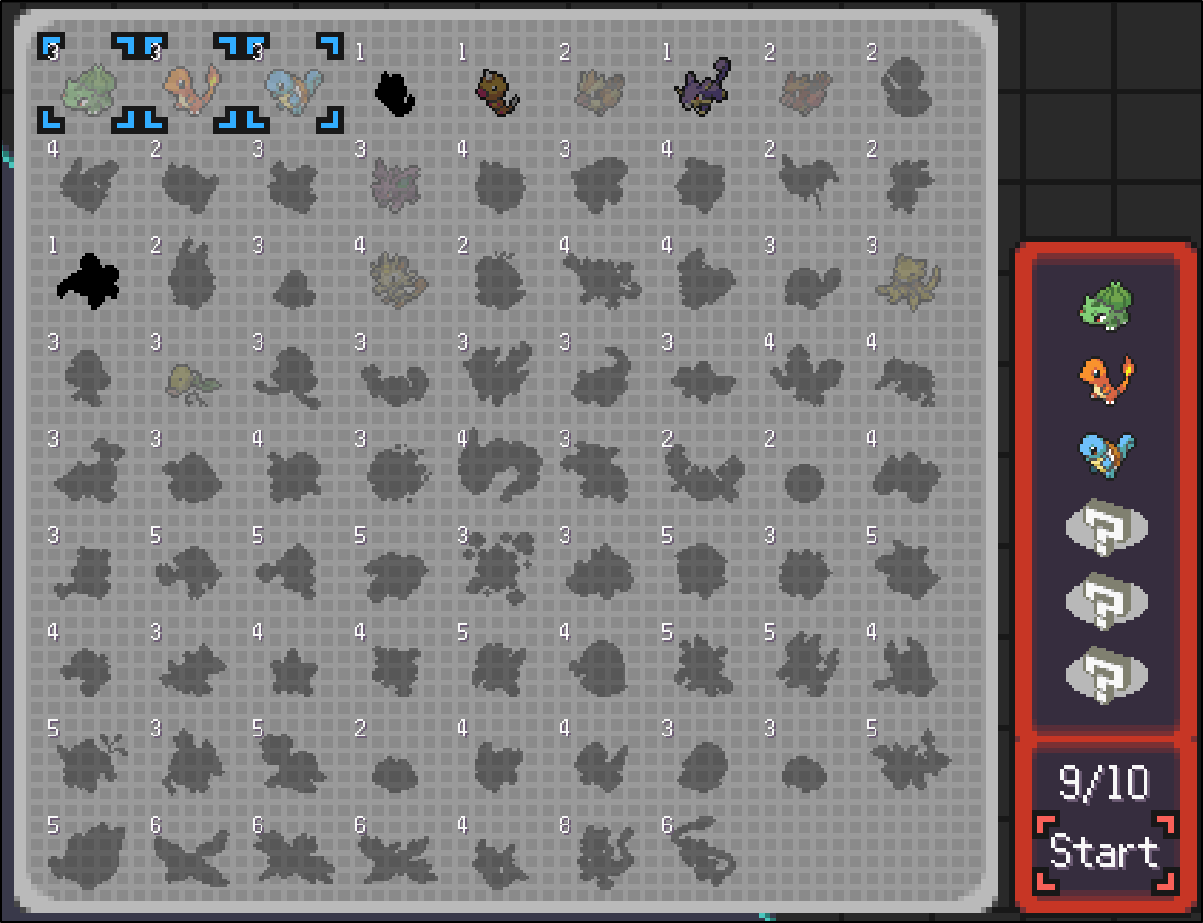
Ouch. I only made it to about level 8. Harsh.
Along the way though, I did catch this little friend:

So now when I start a new run, I should have the option of using this absolute unit:
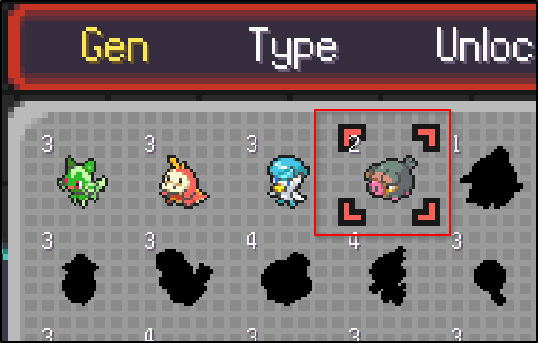
Confirmed. Now comes the fun part. Let’s open up the web developer console (F12 on the keyboard) and refresh the webpage to see what kind of JavaScript shenanigans are happening. I’m using Mozilla Firefox for all this BTW.
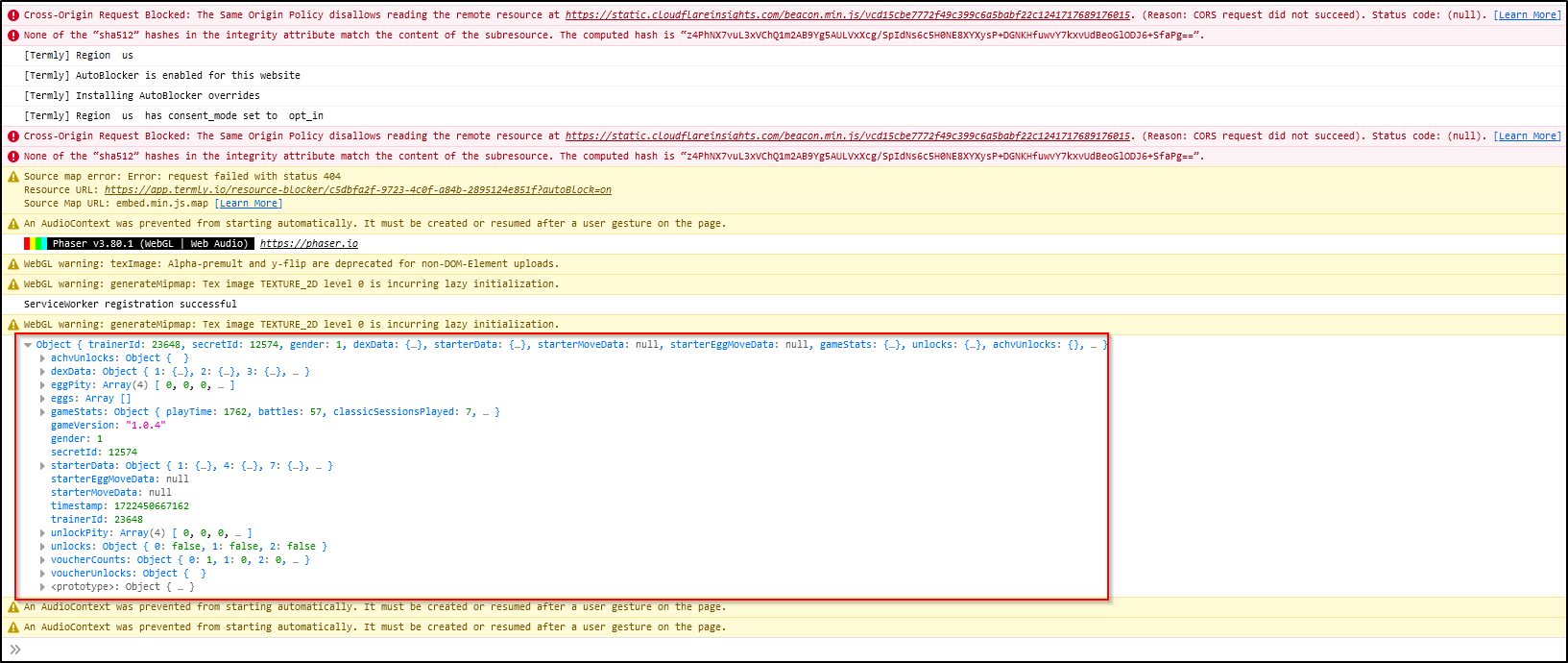
I highlighted the interesting bit there. It appears to be game save data. The data I’m interested in are flags that indicate whether or not a Pokémon has been ‘unlocked’. Let’s explore a bit.
The ‘dexData’ object appears to contain what I’m looking for. It is a very large JSON object (1000+ entries) that appears to contain data about the Pokémon we’ve encountered in the game. The values that really peak my interest are ‘caughtAttr’ and ‘seenAttr’.
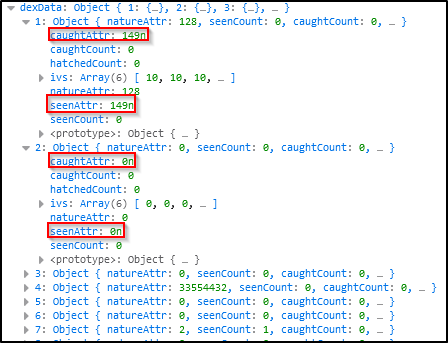
My assumption is that each child object here corresponds to a Pokémon in the game in Pokédex order. This is confirmed by the above screenshot because Bulbasaur, Pokémon #1, has non-zero values here, while its evolution Ivysaur (Pokémon #2 which I haven’t caught yet) has zero values.
If we really want to confirm this though, we need to check on our boi Lechonk. According to Bulbapedia, it is Pokémon #915

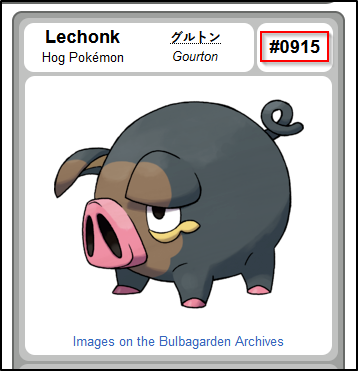
So let’s take a look at object #915 then
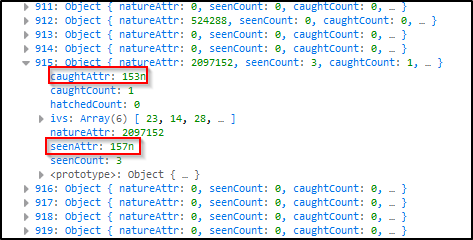
Seems to be confirmed. Let’s find the spot in the JavaScript code where this JSON object is getting printed out. If we look on the right side in the web console, it should give us the filename and exact spot where this log statement was made

Click on that and we get…

A nasty minimized JavaScript file. The ‘l’ variable there appears to hold the data we need. I’ll copy the contents of this JavaScript file and paste it into an empty file on my PC.
Before I do anything else, I’d like to clean up the minimized JavaScript. Very hard on the eyes. I’ll copy paste the contents of my local file into the following website:
 https://beautifier.io/
Give it a minute to process and voila:
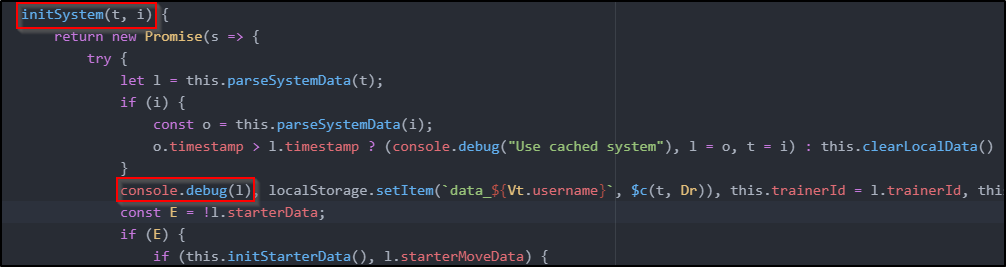
Nice clean JavaScript. Another copy paste and I have a readable file on my PC. Going off the above screenshot, it appears the data we are after is coming from an input into the ‘initSystem’ function called ‘t’. It also appears there is a comparison being done between the timestamp of cached data (i) and this 't' data. Let’s see where this ‘initSystem’ function is being called
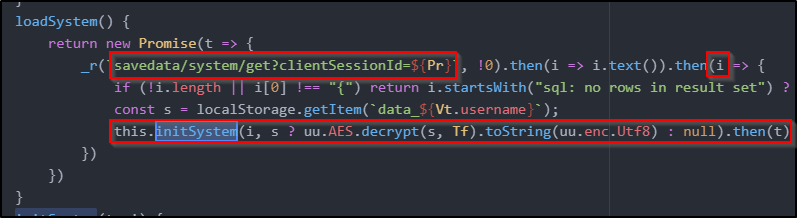
Looks like it’s our data is coming from an API call. It is then also decrypting data from local storage, which is likely the cached data we came across before. If the cached data is more recent, then it is used instead of the data from the API. It’s all coming together.
So there are two avenues we can go down at this point. We can either try to decrypt the cached data and then mess with it locally, or spoof an API to feed it custom app data. I like option 2. This also minimizes the footprint of our cheating, since at no point are we going to touch the legit API.
First things first, let’s find out the API URL. This should be simple enough. I’ll open up the ‘Network’ tab on the web console and refresh the PokéRogue tab

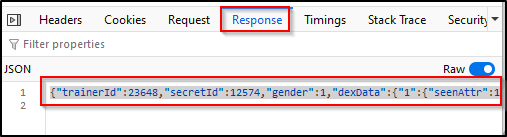
The URL structure there matches what I found in the source code, so we officialy have our FQDN, ‘api.pokerogue.net’. I'll note that down for later. While I’m here I’ll also copy and paste the raw response JSON into a local file called ‘systemsavedata.json’. I recommend you do the same for later.
Alrighty, time to spoof an API. First things first, I need an application on my computer which can divert API requests to wherever I want. Fiddler Classic is a good option here.

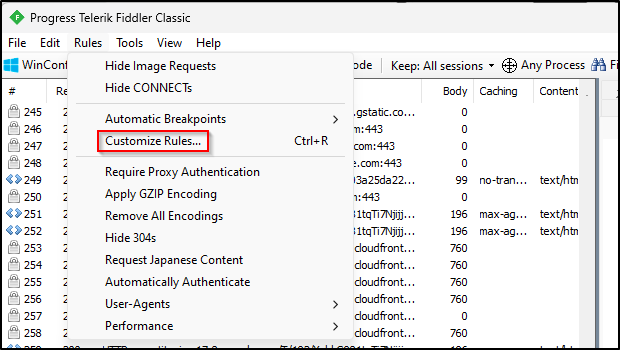
Once Fiddler Classic is downloaded I’ll open up the app and go to Rules → Customize Rules…
That will open up a text editor where we can define rules on network traffic. Scroll down in this file until you see a function called ‘OnBeforeRequest’. Right underneath that is where I’ll inject our rule
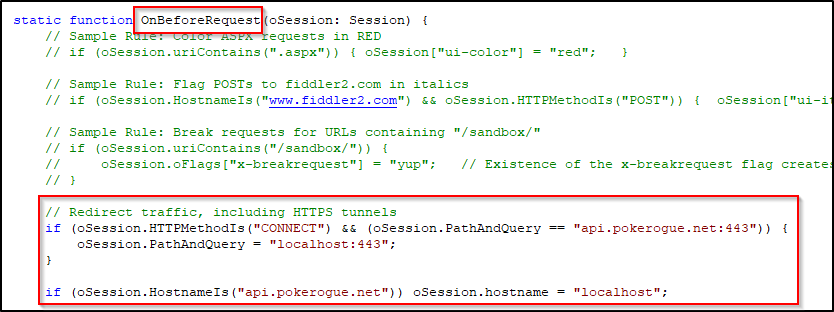
Here is the raw text of the rule I wrote:
if (oSession.HTTPMethodIs("CONNECT") && (oSession.PathAndQuery == "api.pokerogue.net:443")) {
	oSession.PathAndQuery = "localhost:443";
}

if (oSession.HostnameIs("api.pokerogue.net")) oSession.hostname = "localhost";
This rule essentially diverts TLS (SSL) connections from the intended URL of ‘api.pokerogue.net’ to localhost. You will want to confirm in your system ‘hosts’ file if localhost is indeed pointing to the loopback address 127.0.0.1 (I believe by default it is). You'll need to leave the Fiddler Classic app open and running for the rest of the guide
Once that is done I can test the redirect by going to ‘https://api.pokerogue.net’ in my browser:
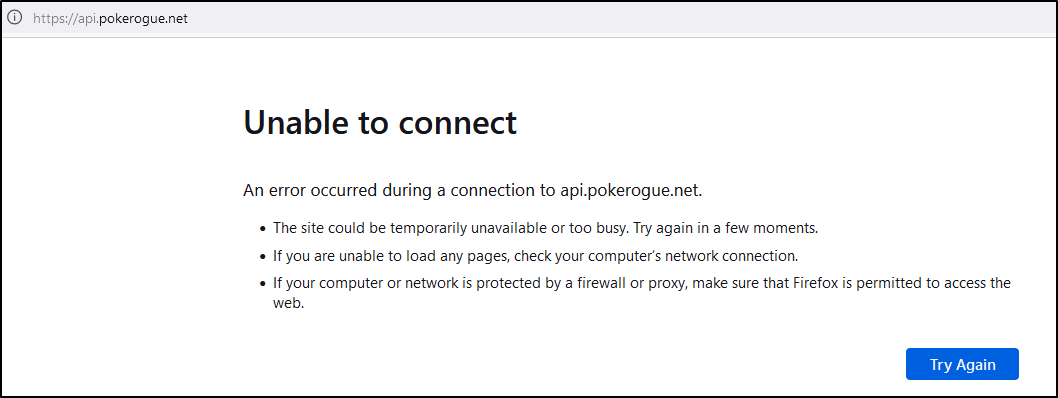
That looks bad, but it’s actually a good sign. We don’t have anything running on localhost port 443, so being unable to connect is expected. Let’s fix that now.
I like to use Flask (I know the performance sucks) to setup simple APIs. This API will have to support TLS/SSL, so before we do anything we need to generate SSL keys and a certificate. Let’s knock that out really quick.
Ensure you have openssl installed on your Windows computer and then open a Command Prompt, cd into the directory you want to run your API in, and then run the following commands:
openssl req -new -key server.key -out server.csr
cp server.key server.key.org
openssl rsa -in server.key.org -out server.key
openssl x509 -req -days 365 -in server.csr -signkey server.key -out server.crt
Go ahead and enter whatever values you want for the passwords and other parameters. It doesn’t really matter that much.
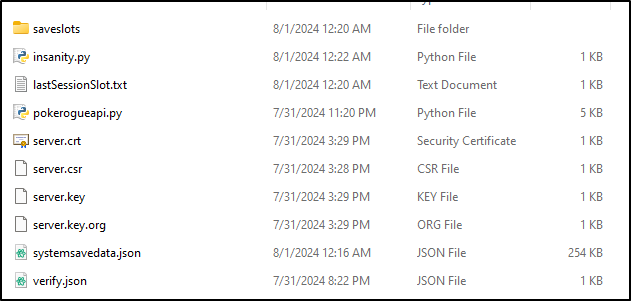
By the end you should have created four files: ‘server.crt’, ‘server.csr’, ‘server.key’, and ‘server.key.org’.
Our new SSL certificate, ‘server.crt’ is self-signed so our browser will throw a fit when it tries to communicate with it. Let’s address that right now. We need to add this ‘server.crt’ file to our browser's list of accepted certificates. I’ll link a guide on how to do this in Firefox.
 https://support.globalsign.com/digital-certificates/digital-certificate-installation/install-client-digital-certificate-firefox-windows
Once that is done it’s time to setup our base API. Here’s the most basic Python code to do this:
from flask import Flask, make_response

app = Flask(__name__)

@app.route('/')
def default():
    response = make_response('HELLO!')
    return response

if __name__ == '__main__':
    # Fill in names of certificate and key here
    context = ('server.crt','server.key')
    app.run(debug=True, ssl_context=context, port=443)
Make sure you save this code in the same directory as the certificate we generated before. If you don’t there will be trouble.
So running our API is pretty simple:
python pokerogueapi.py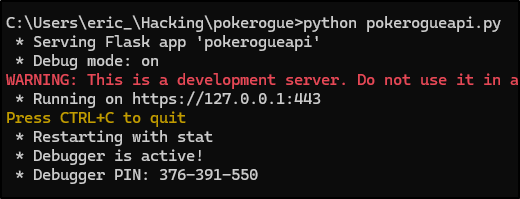
With that running, if we try the same test from before we should get a different result:

Perfect. Now comes the fun part. I need to play the game while identifying API calls it is making. Then I need to implement those API calls within my Flask app here. I’ll do my best to preserve functionality, but I make no guarantees on 100% coverage. Basically all I’m after is being able to select whatever Pokémon I want from the beginning. Wish me luck.
Alright, done. Here is a link to the resultant project zip file (this archive includes a couple other files, don’t mess with these yet):
Go ahead and download and extract this file. You need to update line 9 of ‘pokerogueapi.py’ with your PokéRogue username

If you are following along at home and haven’t followed all the steps, here is a crash course on everything you need to do up to this point:
- Download and setup Fiddler Classic with the custom rule I defined. Ensure it is running. Jump to this section
- Download the zip archive I just linked to and extract it to get the ‘pokerogueapi’ directory.
- Update line 9 of the ‘pokerogueapi.py’ file with your PokéRogue username.
- Generate the SSL certificate and keys in the ‘pokerogueapi’ directory, and add the certificate to your browser. Jump to this section
- Copy and paste the save game data captured in the web developer console into a file called ‘systemsavedata.json’ in the ‘pokerogueapi’ directory. This is what the API uses to load ‘unlocked’ Pokémon data. Jump to this section
- Run the 'pokerogueapi.py' Python file from a Command Prompt. Jump to this section
If you’ve done everything right, then your extracted ‘pokerogueapi’ directory should look like this:
Now to make all my dreams come true. I want to unlock a badass Pokémon. From my childhood I remember there was one Pokémon that was basically unstoppable:
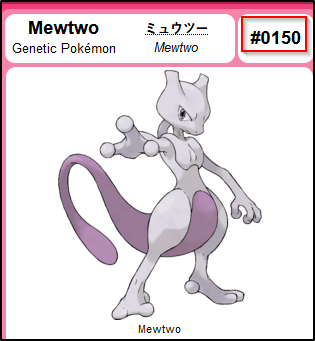

Mewtwo could steamroll any other Pokémon in the game. I’m not sure how true this is today, but I know what I want. Let’s try and unlock him.
I’ll open up the ‘systemsavedata.json’ file (I beutified this too BTW) and find entry #150 of the ‘dexData’ array, where the data for Pokémon #150 (Mewtwo) resides.
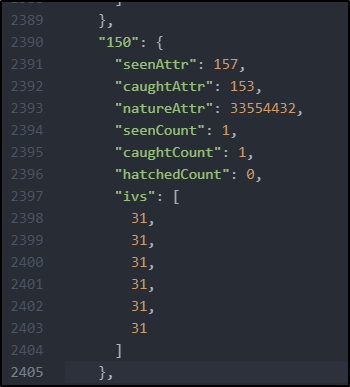
I went ahead and filled in the values you see there. All these values I got from the Lechonk entry, except for ‘natureAttr’ and ‘ivs’. Being a Pokénerd myself, I know that ideal IVs for a Pokémon are 31 across the board. This essentially means our Mewtwo will be as powerful as possible. For the ‘natureAttr’ value, I copied the value from one of the already unlocked starters, since they all have neutral natures. I won’t bother explaining that at all, just believe me it’s beneficial.
Alright, now for the moment of truth. I’ll make sure both Fiddler Classic and my API are running and I’ll fire up the game:
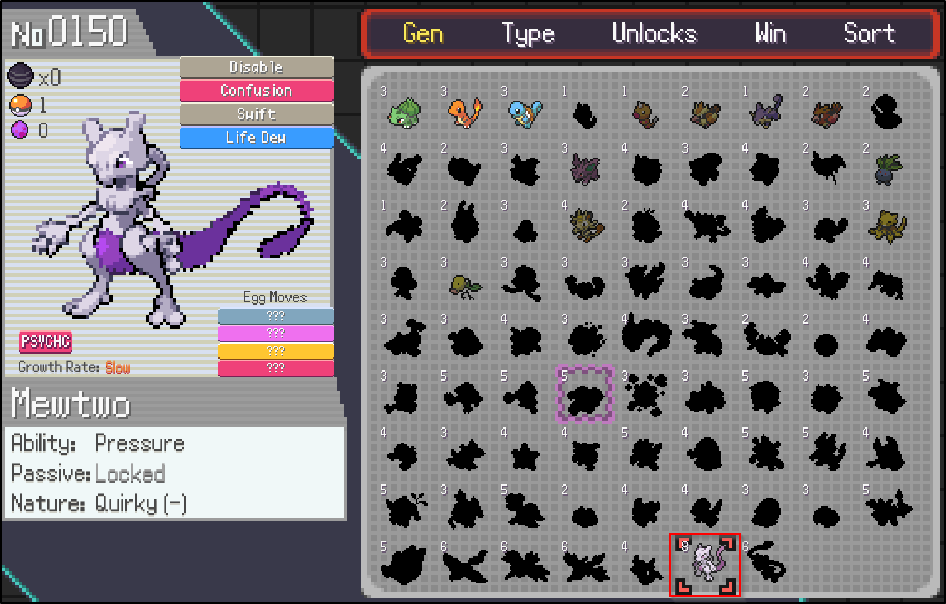
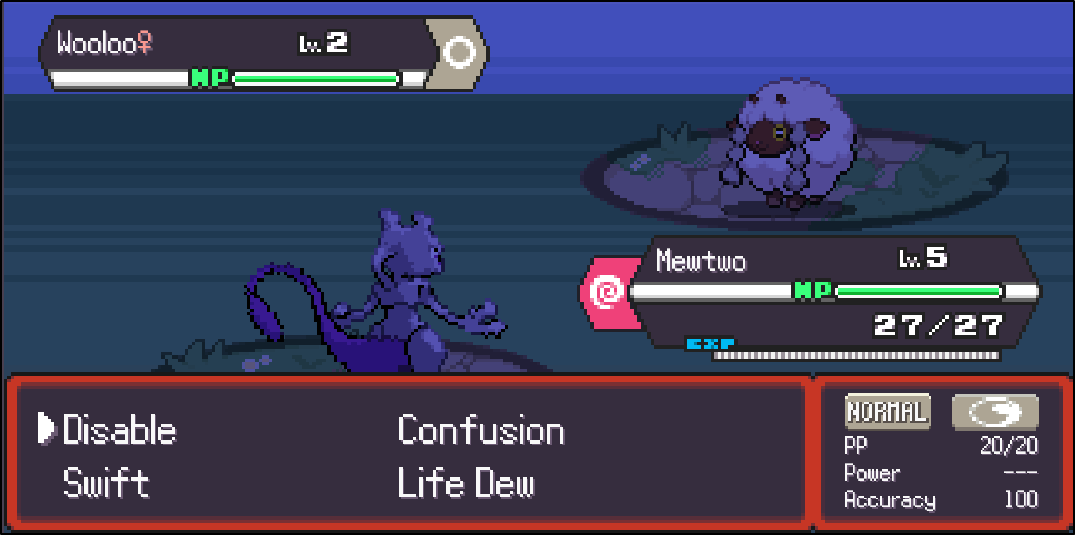
That is hilarious. I have just the thing to dial it up to 11 though.
Are you at all wondering what the ‘insanity.py’ file is for in the ‘pokerogueapi’ directory? Wonder no more. This script automatically updates the ‘systemsavedata.json’ file to unlock ALL Pokémon in the game with max IVs. Running it is pretty simple:
python insanity.py
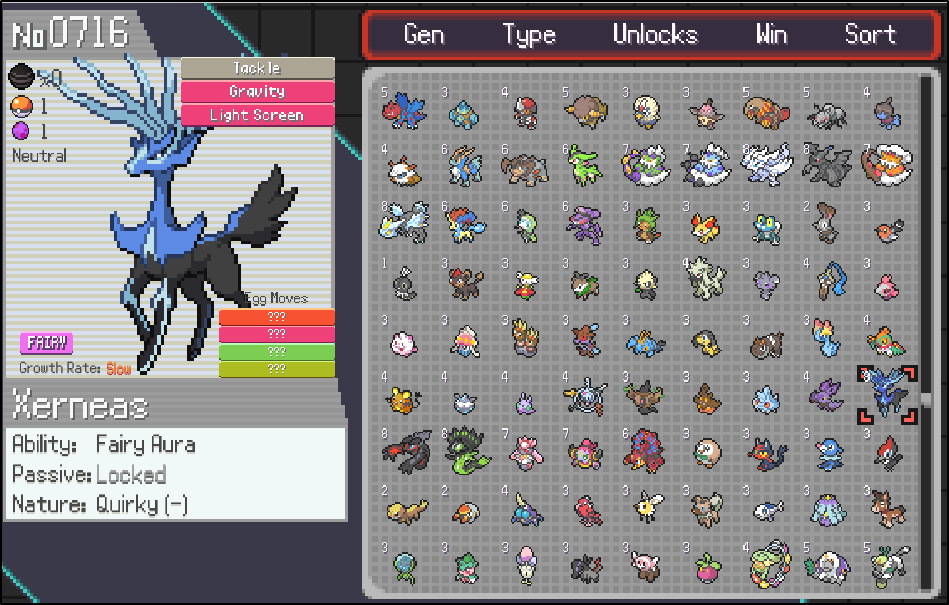

Hahaha, that’s pretty good. The game is pretty busted now that you can bring any Pokémon you want into the early levels. Outstanding.
Alright, that was pretty fun. Here’s an important note: once you are done with these shenanigans and turn off Fiddler Classic, it is important to clear all the ‘Local Storage’ values in your browser cache BEFORE logging back into PokéRogue. Here’s how to do that in the Firefox web developer console:
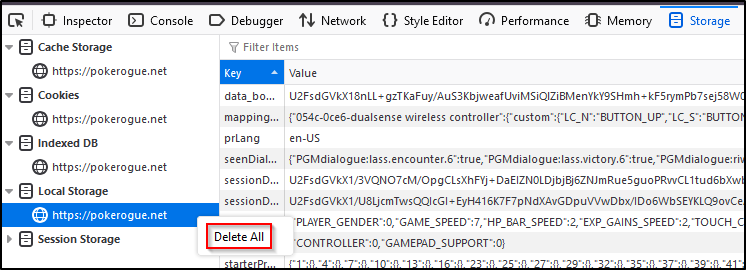
This will delete all the Pokémon you’ve unlocked/maxed out with this method. Once you do this and log back into PokéRogue, your progress will revert back to where it was before all this craziness. “But why?” you ask. “Isn’t the whole point of this to unlock all these Pokémon”? Well, let’s just say that if the developers notice someone going offline and then all of a sudden coming back online with all Pokémon unlocked with max IVs, they are going to suspect something. Your account will probably be banned. RIP.
I share this information for educational purposes, and also because I think it’s funny. I’ve always been interested in Pokémon, and this game really scratches an itch Nintendo just can’t seem to figure out. I wish the developers the best, and hope to see more interesting content from them soon. Have a good day.